Top 9 Data Security Mistakes IT Managers Make During Equipment Disposal (and How to Fix Them)
When it’s time to retire equipment, most organizations treat disposal as a logistics step: pick up, erase, recycle. That usually works fine until a small overlooked component or process gap leaves sensitive data exposed.
At Data Recycling of New England, we regularly catch things that others miss. Often the small details that separate a smooth offboarding from a security or compliance headache.
Below are nine common oversights we see during equipment disposal — and what to know before you send your hardware off for recycling.
1) Multiple-drive laptops and desktops (2.5″, M.2, and onboard storage)
Many laptops and desktops ship with more than one storage device an M.2 for the operating system plus a 2.5″ SSD or HDD for storage or backup. It’s easy to remove one and assume the job is done.
If you’re sanitizing or securing data in-house before recycling, double-check for multiple drives. A good recycler will verify this anyway, but you don’t want data-bearing components leaving your facility unaccounted for.
Fix: Inventory every drive before disposal and check your BIOS or device management to make sure there isn’t other media you’re missing. Our in-house testing software automatically scans for all storage types – onboard, M.2, or 2.5″ and flags any devices containing drives so they’re securely wiped or shredded before resale.
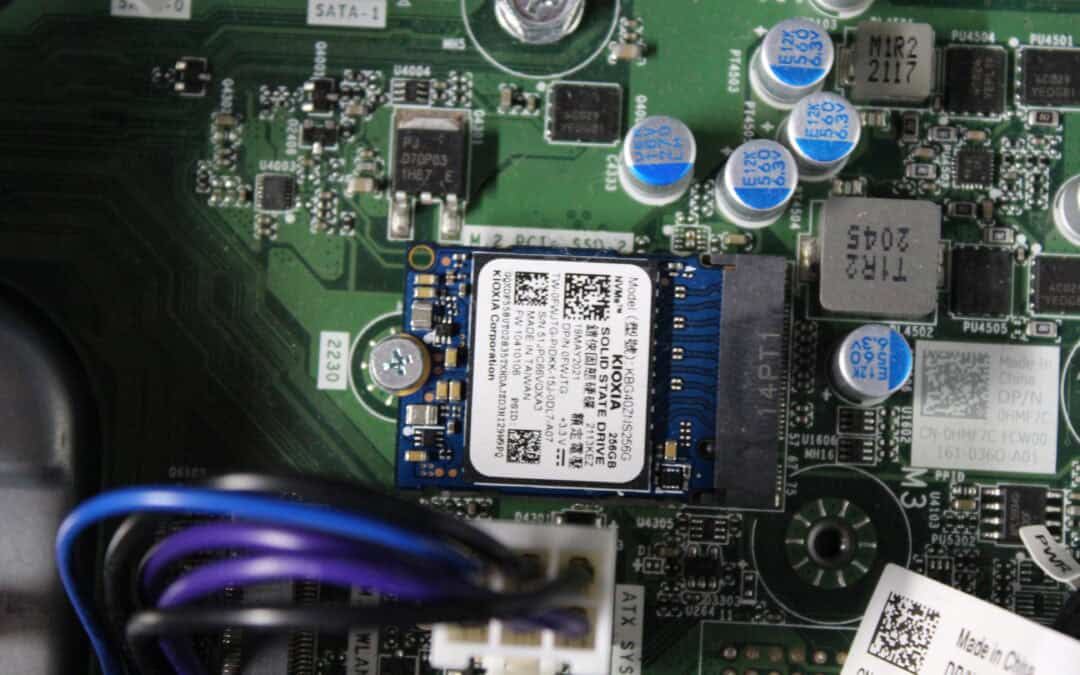
2) Tiny M.2 and NVMe drives that slip through the cracks
These drives are small, flat, and come in multiple sizes, often blending into the motherboard. They’re easy to miss during teardown or internal wiping.
If you remove data yourself before sending equipment out, make sure your team knows what to look for. For customers who rely on us to handle data destruction, our process includes checking every system for these smaller drives automatically.
Fix: Confirm your recycler identifies and destroys all drive types, including M.2, NVMe, and mSATA, with shredders designed for SSDs.
3) Overlooked drives in computers or rack equipment
In rack servers and modular systems, small SSDs or expansion modules can hide behind panels, risers, or adapters and can easily be mistaken for non-storage components. Visual checks alone often aren’t enough.
This is one of the most common areas where we find missed drives. If you’re not doing internal verification, make sure your recycler’s inspection process includes checking these hidden modules before destruction.
Fix: Work with a recycler trained to inspect internal components, not just the obvious drive bays. Proper teardown protocols help ensure nothing is missed.
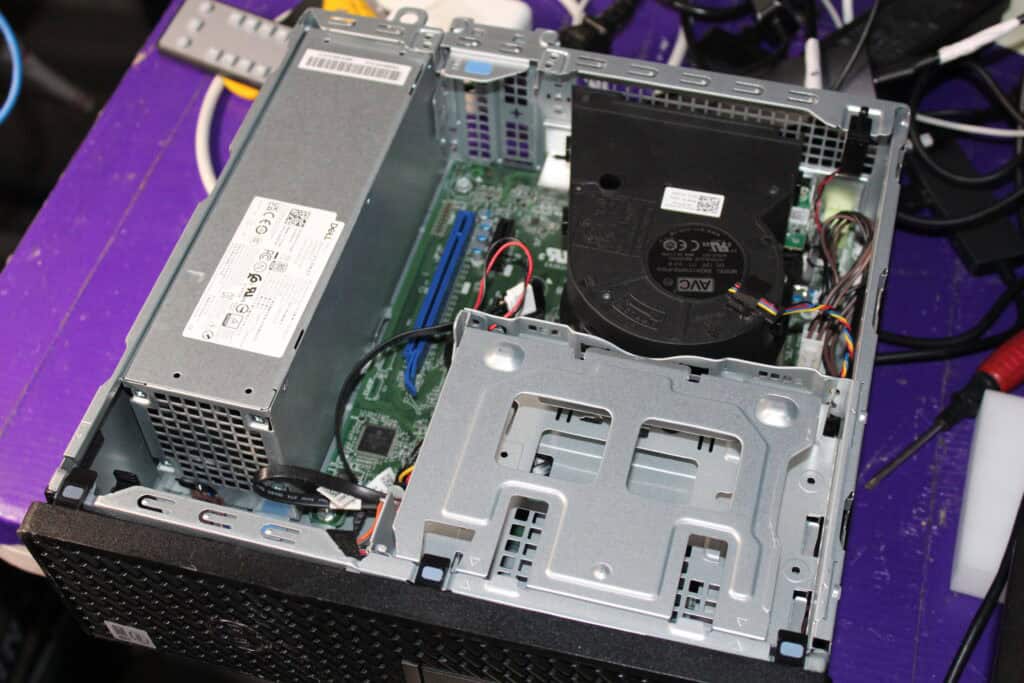
Appears to have no hard drive
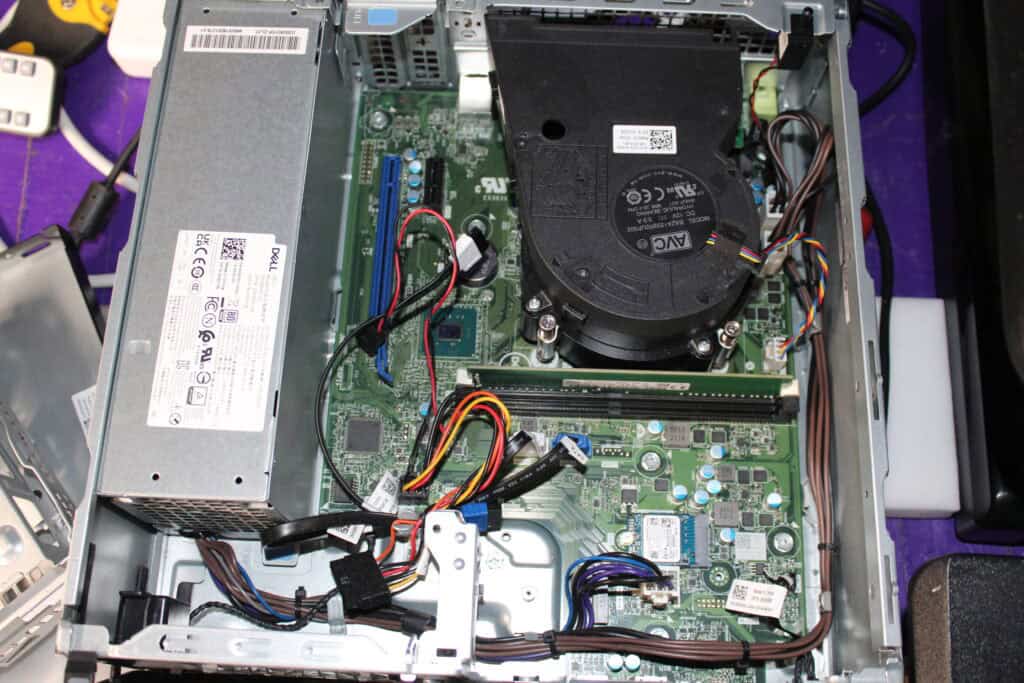
But there’s a smaller m.2 inside
4) Devices still enrolled in management or MDM systems
Chromebooks, iPads, Macbooks, Windows PCs, and other managed devices often remain tied to enterprise management after wiping. When they connect to the internet again, they can “call home,” revealing the previous owner or even re-enrolling automatically.
Fix: Always remove devices from MDM or enterprise management before recycling, or clearly flag which devices are still enrolled so they can be handled with extra precautions.
5) BIOS, firmware, or asset-tag traces that reveal company identity
Even when drives are gone, devices can still display your organization’s name through BIOS locks, firmware fields, or embedded asset tags. This not only limits resale value but can expose your company identity downstream.
Fix: Clear BIOS/firmware information and remove identifying stickers or overlays before resale. Units that can’t be unlocked or sanitized should be securely destroyed.
6) Company engravings and stickers that reveal identity
Even if drives are wiped and BIOS information is cleared, company engravings and stickers can still identify where a device came from. We often receive laptops and tablets with asset tags, security stickers, or laser engravings displaying the organization’s name or contact information.
If those markings remain, they can still connect the device back to your company — which isn’t ideal when items are reused or resold.
Fix: Before equipment leaves your facility, remove or cover any labels or engravings that contain identifying details. At Data Recycling of New England, we remove stickers using razors and carefully etch over engravings with a Dremel or engraving machine this a process we use primarily for devices that are resold locally. Click here to learn more about our de-engraving process.
7) DIY drive drilling that misses the target (sometimes literally)
We’ve seen it more than once — someone takes a drill to a laptop, punching holes through the case, keyboard, and even the screen, thinking they’re “destroying the data.” The result? A completely ruined laptop with the storage device inside still perfectly intact.
If you’re attempting to destroy data before recycling, know that improper physical methods don’t make your data safer as they just make devices harder to handle afterward.
Fix: Skip the power tools. If you need your data physically destroyed find a electronics recycler that has clear data procedures with a shredder. It’s safer, more secure, and ensures every drive is handled responsibly from start to finish.
8) Using shredders that aren’t SSD-capable
Not all shredders are designed for solid-state drives. Larger-tooth shredders that handle hard drives can leave SSD fragments large enough to be recovered.
Fix: Verify that your vendor uses an SSD-capable shredder. At DRNE, our FlashEx SSD shredder reduces SSDs to fine particles that meet NSA destruction standards. For more information on our SSD Shredder
9) Choosing a recycler without clear data procedures
Not all recyclers handle data the same way. Some don’t provide serial tracking, chain-of-custody documentation, or certificates of destruction — leaving gaps in accountability. While certifications like R2 or e-Stewards are valuable, transparency and process matter most.
Unfortunately, there are companies that falsely claim to be certified to gain credibility. If a recycler says they’re R2 or e-Stewards certified, always verify them directly through the official directories:
Misrepresenting certification is one of the worst red flags in our industry. If a company is willing to lie about something that fundamental, it’s hard to trust how they handle data or downstream material. There are even companies that will put R2 in their name to trick customers.
At Data Recycling of New England, although we use an R2 downstream , we’re not R2 certified and we’re fully transparent about that. We believe integrity and clear communication matter more than chasing credentials just for marketing purposes. (yes, we check our downstream and yes we have had several companies come to us to purchase material and say they were certified and they were not)
Fix: Choose a recycler that documents intake inspections, provides certificates of destruction, and can clearly explain what happens to your equipment and data from start to finish and make sure their claims check out.
How We Help
At Data Recycling of New England, we’ve built systems that automatically detect every storage device during testing and ensure anything containing data is handled securely before resale. Our process includes:
-
Automated drive detection (onboard, M.2, and 2.5″)
-
SSD-capable shredding with verified particle sizes
-
Serial number tracking and certificates of destruction
-
On-site shredding available for customers who require direct witness verification
-
Secure downstream R2 processing for non-working or onboard-data devices
Whether your goal is compliance, security, or peace of mind we make sure your data is fully protected and processed only through trusted, verified channels.
Final Thought
Disposal isn’t just logistics, it’s risk management. A missed M.2, a leftover engraving, or a shredder that’s not built for SSDs can turn a routine project into a breach.
Partner with professionals who find what others miss.
👉 Learn more about our hard drive shredding services or contact us to schedule secure pickup or on-site destruction.